Get a free quote
Thanks for getting in touch
What Makes a Great Event Highlight Video? Here is What You Need to Know
Most events are over in a day. The planning behind them can take months, and once the last delegate has gone home and the stage has been stripped, all that effort disappears surprisingly quickly. A great highlight video is how you hold on to it, and how you show people who were not there what they missed.
A highlight video is not a shortened recording of the day. It is something different: a carefully built piece that shows what it felt like to be part of the event. Here we share how we approach them, from filming the setup before the doors open to cutting everything down to an engaging video, along with a few tips we have learned from experience.
It Starts before the doors open.
Some of the most watchable footage from any event happens before a single guest arrives. Equipment being unloaded, staging going up, lights being focused, an empty venue slowly turning into something people will remember. Audiences rarely get to see this part, which is exactly why it works so well on screen.
On a recent event, we set up an Insta360 camera to record timelapses of the build from several positions around the venue. Hours of work become a few seconds of footage that shows the scale of the production, and just how efficient the get in and get out really were. A few things we have learned:
- Choose your positions early. Walk the venue with the production team so the camera is out of the way of crew and kit, and nobody needs to move it halfway through.
- Go high where you can. A raised, wide position shows the whole space changing, rather than just one corner of it.
- Use the 360 view to your advantage. Because a 360 camera records everything around it, we can choose the framing in the edit rather than guessing on the day.
- Plan for power and storage. A timelapse running for several hours needs both. Check them before you walk away.
- Film the get out too. A timelapse of the room being cleared makes a satisfying closing shot, and shows how quickly the team works.
Why one camera is rarely enough
A single camera at the back of the room will tell you who spoke. It will not tell you how the room felt while they were speaking. For that you need more than one point of view.
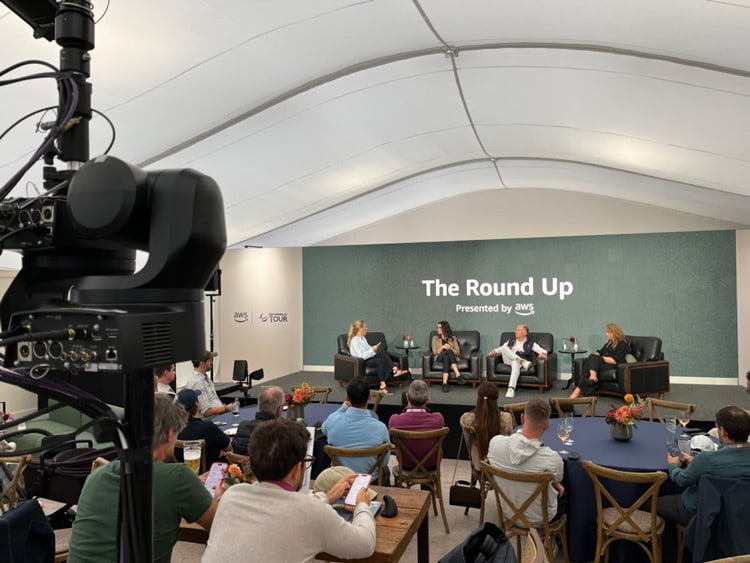
For this event we had two camera operators, each covering specific parts of the programme. During the keynote sessions their cameras fed a live vision mix, giving a polished cut of each speaker as it happened. Between sessions, they were free to move around the venue and film B roll: the details, reactions and in between moments that give a highlight video its character.
The key is agreeing who covers what before the day. We work through a shot list with each camera op, so a keynote is never left uncovered while someone chases a great shot in the foyer.
Capturing real emotion and atmosphere
The best highlight videos remind people who were there how it felt and make people who were not there wish they had been. That comes from capturing it live, real moments rather than staged ones. Here is the kind of B roll we look out for:
- Faces in the audience at the moment a speaker lands a point
- Conversations, handshakes and coffee queues during the networking breaks
- The room filling up, and the buzz just before a session begins
- Applause, laughter and the occasional standing ovation
- Small details of the set, branding and lighting that show the care that went in
One hint worth remembering: record natural sound wherever you can. Even if the finished video is cut to music, a few seconds of real laughter or applause brings the viewer straight into the room.
A great highlight video does not show everything that happened. It shows what it felt like to be there.
Telling the whole story in under a minute
Cutting a full day, or several days, down to under sixty seconds is where the real craft lies. Every shot has to earn its place. This is how we approach the edit:
- Open strong. The first few seconds decide whether someone keeps watching, especially in a busy social feed.
- Follow the day. Build, arrivals, keynotes, networking, celebration, get out. A simple timeline gives the edit a natural shape that viewers can follow.
- Let a speaker speak. One short line from a keynote gives the video a voice and tells viewers what the event was about.
- Add captions. Many people watch with the sound off, so on screen text helps the story land either way.
- Make more than one version. A landscape cut for your website and LinkedIn, a vertical cut for Instagram and short clips for sharing. Same footage, more reach.
One Video that does many jobs
A highlight video keeps working long after the event. The same footage can be used in several ways:
- Company archive. A record of the event, its people and its scale, ready to look back on in years to come.
- Social content. Short, shareable clips that keep the conversation going in the days after the event.
- Sales collateral. The build timelapse and finished event show prospective clients and sponsors exactly what can be delivered.
- Behind the scenes. Showing the production itself reflects well on everyone who helped make the day happen.
- A teaser for next year. A ready-made trailer to build anticipation and encourage early registrations.
Thinking about these uses before the event helps us plan what to film. If the video will help sell sponsorship next year, for example, we make sure sponsor branding and stands are captured well. And while the crew are on site, the same day can often cover speaker interviews, client testimonials or a live stream for anyone who cannot be there in person.
What you need to know to make one
If you are thinking about a highlight video for your next event, a little preparation goes a long way. These are the things we ask about at the start, and having the answers ready makes planning much quicker:
- What is the video for? Marketing, sales, internal communications or next year’s registrations. The purpose shapes what we film and how we cut it.
- Who will watch it? Delegates, prospective clients, sponsors and your own team each need a slightly different story.
- The running order. The agenda tells us which sessions need full vision mixed coverage and when the camera operators are free to roam.
- Access times for the build and get out. To film the timelapse we need to be in position before the crew start, and stay until the room is clear.
- The moments that matter most. A keynote, an award, a product launch or a sponsor you want featured. Tell us in advance so nothing important is missed.
- Where it will be shown. Your website, LinkedIn, Instagram or a big screen at your next event. Each one affects the format and length of the edit.
- When you need it. If you would like a short clip on social while the event is still fresh, we can plan the edit around that.
- Brand guidelines and music. Logos, fonts, colours and any thoughts on music help the finished video feel like yours.
Do not worry if you do not have every answer yet. That is exactly what the first conversation is for.
Key Takeaways
A great event highlight video is planned, not stumbled upon. Know the story you want to tell and how the footage will be used, and the day itself becomes much easier to capture well.
- Start filming at the build, not the welcome speech
- Use more than one camera, with clear roles for each operator
- Prioritise real reactions and natural sound over posed shots
- Keep the final cut under a minute, with captions and a version for each platform
- Plan for archive, social, sales and next year’s teaser from the outset
- Share your purpose, running order and key moments with the crew before the day
ABOUT THE AUTHOR:

Matt Downer
Matt is our Production Manager. He manages video projects from the first phone call through to the final edit. He brings a blend of creativity, logistical knowhow and a passion for all things video-related. Matt loves running, cooking and watching Back to the Future.
Planning Your Next Event?
Everything starts with a conversation. Whether you need a highlight video, live vision mixing for your keynotes or a full live stream, get in touch and we can talk through what would work best for your event.
Get in touch